

How we went from inconsistent results and infrastructure chaos to a reliable, automated performance regression pipeline for Remix apps.
Why We Built This
Frontend Platform owns the template layer that all Remix apps at CarGurus build on.
When the template ships changes — dependency upgrades, platform improvements, new defaults — those changes ripple across every consumer. A 100ms regression in LCP doesn’t show up in unit tests or linting. It only shows up in production, after it’s already slowed down real users.
We needed a way to catch performance regressions before they shipped — not just backend latency, but real Core Web Vitals: LCP, INP, CLS, TTFB. And we needed it to run automatically on every relevant change, integrated into CI/CD, with clear pass/fail signals.
That’s what the k6 load testing pipeline was built to do.
Choosing the Tool: k6 vs Locust
Before building anything, we evaluated two options: the in-house Locust self-service load testing tool already offered to all engineering teams, and k6 from Grafana.
The Locust tool’s strength is organizational familiarity — it’s already in use for backend services. But for our use case, it had a fundamental gap: it couldn’t measure Core Web Vitals. It could tell us server response times, but it couldn’t tell us whether a user’s browser actually rendered the LCP element in time.
In addition, the self-service load testing tool periodically auto-deletes load test deployments, which conflicts with our need for stable, repeatable configurations and persisted results for longitudinal template/platform benchmarking.
k6’s browser module changes the equation.
A single k6 script can run both a backend load test (constant RPS via ramping-arrival-rate, measuring HTTP response times) and a CWV collection phase (headless Chromium, measuring real browser metrics).
What made this compelling:
- One script, both dimensions — backend latency and real browser metrics collected in the same test run.
- Unified reporting — both sets of results feed into the same baseline comparison and produce a single pass/fail signal.
- TypeScript all the way down — test scripts are written in the same language as the apps being tested.
- Self-contained regression detection — k6’s
handleSummaryAPI lets us intercept all results and run baseline comparison, majority voting, and report generation entirely within the k6 process, without external tooling.
The Initial Setup
With the tool selected, we built out a first version of the pipeline. The load-testing-suite repo runs as a service pod on our Kubernetes cluster.
When a new release tag becomes available in the Remix template, it:
- Deploys the target app to an isolated environment (using a truncated CI run identifier as a unique selector, preventing parallel test collisions).
- Warms up the app with one single HTTP
GETrequest before k6 starts. - Runs two k6 scenarios concurrently:
backend_load— constant RPS for backend metrics.cwv_collection— headless Chromium for browser metrics.
- Compares results against the 3 most recent saved baselines using majority voting — if 2 of 3 show a critical regression, the test fails. (Baselines are JSON files committed to the load-testing-suite repo’s
baselines/directory, one per build, written by k6’shandleSummaryand persisted via Git.) - Cleans up the deployment.
The orchestration between the Remix template repo and the load-testing-suite repo uses GitHub’s workflow_call mechanism — the template repo’s test-orchestrator.yml calls load-testing-suite’s run-test.yml as a reusable workflow.

The Instability Problem
Once the pipeline was running end-to-end, we hit a serious problem: the results weren’t reliable. The same commit, tested twice, could produce wildly different numbers.
Here’s what we saw across two runs against the same commit:
| Metric | Run 1 | Run 2 |
|---|---|---|
| Response time P95 | 199ms | 52ms |
| Response time P99 | 598ms | 132ms |
| LCP P75 | 431ms | 295ms |
| TTFB P75 | 52ms | 36ms |
A 4x difference in P95 means the baseline comparison is noise, not signal. Any regression detection built on these numbers would generate constant false positives.
Digging into the test output logs, two patterns emerged.
In the bad runs, TTFB would spike to 200–470ms during the first 30 seconds of the test — the ramp-up phase — and then stay elevated for the rest of the run.
There were also mid-test throughput dips (iteration rate dropping from 20/s to 6/s) that corresponded with outlier P99 values above 900ms.
The root causes fell into two categories: the test design was amplifying noise, and the infrastructure was generating it.
Test Design Fixes
Warming up the app after deployment
A freshly deployed Node.js process doesn’t serve requests at full speed because V8 uses tiered compilation — the compilation tier “levels up” based on how many times a function executes.

For a Remix app, every layer of a request — route handlers, data loaders, serialization — begins in the slower interpreter tier, while the baseline tier kicks in after ~8 invocations.
In our early runs, the first request to a fresh deployment took 95–101ms; steady-state responses settled around 25–35ms. That gap is V8 working through its compilation tiers.
We added a 3-phase warmup between deployment verification and the k6 test:
- Readiness: 3 sequential smoke requests to confirm readiness.
- Hot path warmup: 3 batches of 10 concurrent requests to push hot functions through enough invocations for TurboFan and warm downstream connection pools.
- Steady-state verification: 3 final requests to verify steady state.
The 36 total requests over ~10–15 seconds aren’t a magic number — they’re enough for V8 to promote the critical request path into optimized tiers before the k6 ramp-up begins.
Moving from ramping-vus to ramping-arrival-rate
The original test used k6’s ramping-vus executor.
With ramping-vus, each VU (virtual user — k6’s unit of concurrency, essentially a single simulated client) loops as fast as it can — request, sleep, repeat. If the app slows down, each VU completes fewer iterations per second, so actual RPS drops. The load is coupled to app performance.
For regression testing, this is the wrong model. The variable we’re testing is the code change — so everything else needs to stay constant, including the load.
With ramping-vus, if a code change makes responses 2x slower, the executor responds by delivering 2x less traffic, which can mask the regression. We want to send the same load regardless of how the app is doing, so any difference in P95 is a real signal.
We switched to ramping-arrival-rate, which fires requests at a fixed rate and allocates however many VUs are needed to maintain it.
Extending test duration
The last design fix was the most straightforward: extending the steady-state phase from 2 minutes to 3 minutes, with a 1-minute ramp-up.
At 30 concurrent VUs, we observed periodic 5–10 second slowdowns occurring roughly every 2 minutes — consistent with V8’s major garbage collection pauses under sustained load.
With a 2-minute steady-state phase, a GC cycle might land entirely within the measurement window in one run and straddle the boundary in another, creating significant variance in P95 between runs of the same commit.
We extended the steady-state phase from 2 minutes to 3 minutes to guarantee that every run captures exactly one GC cycle within the measurement window. At a ~2-minute GC interval, a 3-minute steady state ensures the pause always lands inside the window rather than sometimes falling during ramp-up or ramp-down.
Every run pays the same GC cost, so the variance between runs drops.
Infrastructure Fixes
The test design changes made a clear difference. Two runs against the same commit after the fixes:
| Metric | Before (ramping-vus, 2min) Run 1 | Before Run 2 | After (arrival-rate, 3min) Run 1 | After Run 2 |
|---|---|---|---|---|
| Response time P95 | 199ms | 52ms | 81ms | 49ms |
| P95 Variance | 147ms (4x) | 32ms (1.7x) |
Backend variance dropped from a 4x swing to under 2x. But LCP P75 still varied significantly between runs — 368–455ms on some runs, ~260ms on others — with no code changes in between.
The remaining issue was infrastructure-level: the k6 pod was landing on different EC2 instance types each time, and those instance types had meaningfully different CPU characteristics.
We measured the same test across four different instance placements:
| Instance | nr_throttled | throttled_usec | Throttle rate | LCP P75 |
|---|---|---|---|---|
| r5a.24xlarge (gen 5) | 294 | 37.8s | 7.9% | 455ms |
| m5a.16xlarge (gen 5) | 149 | 9.2s | 4.2% | 368ms |
| c6a.2xlarge (gen 6) | 150 | 8.4s | 4.6% | ~260ms |
| m6a.32xlarge (gen 6) | 95 | 6.5s | 2.2% | ~260ms |

The gen 5 instances (r5a, m5a) use AMD EPYC 7571 CPUs running at 2.5 GHz.
The gen 6 instances (c6a, r6a, m6a) use the newer EPYC 7R13 at 3.6 GHz boost.
That’s a ~40% clock speed difference.
| Why instance type matters for LCP: The gen 5 and gen 6 rows above have a ~40% CPU clock speed difference (2.5 GHz vs 3.6 GHz).Chromium’s rendering pipeline — parsing HTML, computing layout, executing JavaScript, painting — is largely single-threaded.A faster clock runs the same rendering work proportionally faster, which directly reduces the LCP measurement. |
The 455ms vs ~260ms gap in the table above has nothing to do with the app’s performance; it’s an artifact of where the k6 pod landed.
CPU limits and CFS throttling
Linux’s Completely Fair Scheduler (CFS) enforces CPU limits in 100ms windows. If a container exceeds its limit during any window, the kernel pauses all its threads until the next window — even if the node has idle cores.

The pod was originally configured with a 3-core CPU request and 3-core CPU limit, making it a Guaranteed QoS class.
The problem: Chromium is briefly bursty during page rendering. It might need 4–5 cores for 200ms during layout and paint, even though its average usage over a 100ms CFS period is within limits. The kernel doesn’t care about averages — it pauses the container the moment it exceeds the limit for that period.
The fix would be to remove the CPU limit while keeping the 3-core request. The pod could then burst above 3 cores when Chromium needs it, eliminating kernel-level throttling during rendering.
QoS would change from Guaranteed to Burstable, meaning the pod could theoretically be evicted under node memory pressure before Guaranteed pods — acceptable for a short-lived test pod.
Moving to gen 6 instances
Removing the CPU limit addressed throttling, but the clock speed variance between gen 5 and gen 6 instances remained.
We couldn’t pin the k6 pod to a specific instance type — our internal tooling doesn’t expose nodeSelector or affinity fields, and the controller reverts any direct kubectl patch to the Deployment within seconds.
We consulted the infrastructure team about this constraint and agreed that pinning the k6 pod to a specific instance type was the wrong fix, since it wouldn’t reflect how production pods are actually scheduled. Instead, they raised the minimum instance generation to 6 across our dev clusters, allowing gen 5 nodes to phase out naturally.
| The key insight: All gen 6 instance families — c6a, r6a, m6a — use the same AMD EPYC 7R13 CPU at the same clock speed.Once gen 5 instances are gone, a k6 pod landing on any gen 6 node will see the same hardware characteristics for CPU-bound work.The variance from CPU clock speed differences goes away. |
The Stabilized Workflow
With all changes in place, here’s what the pipeline looks like:
Test configuration:
- Executor:
ramping-arrival-rate - Stages: 1-minute ramp-up → 3-minute steady state.
- Max VUs: 5 (sufficient headroom at 5 RPS with ~50ms response time).
Infrastructure:
- k6 pod: 3-core CPU request, no CPU limit (Burstable QoS).
- Cluster: gen 6 minimum instance generation (EPYC 7R13, uniform clock speed across all placements).
- Node.js cluster: 3 explicit workers (
CLUSTER_CPUS=3), not auto-detected from host.
Orchestration:
- GitHub Actions
workflow_callfrom the template repo to load-testing-suite. - Isolated environments via unique CI run identifier as selector.
- Baseline comparison using majority voting across the 3 most recent saved baselines.
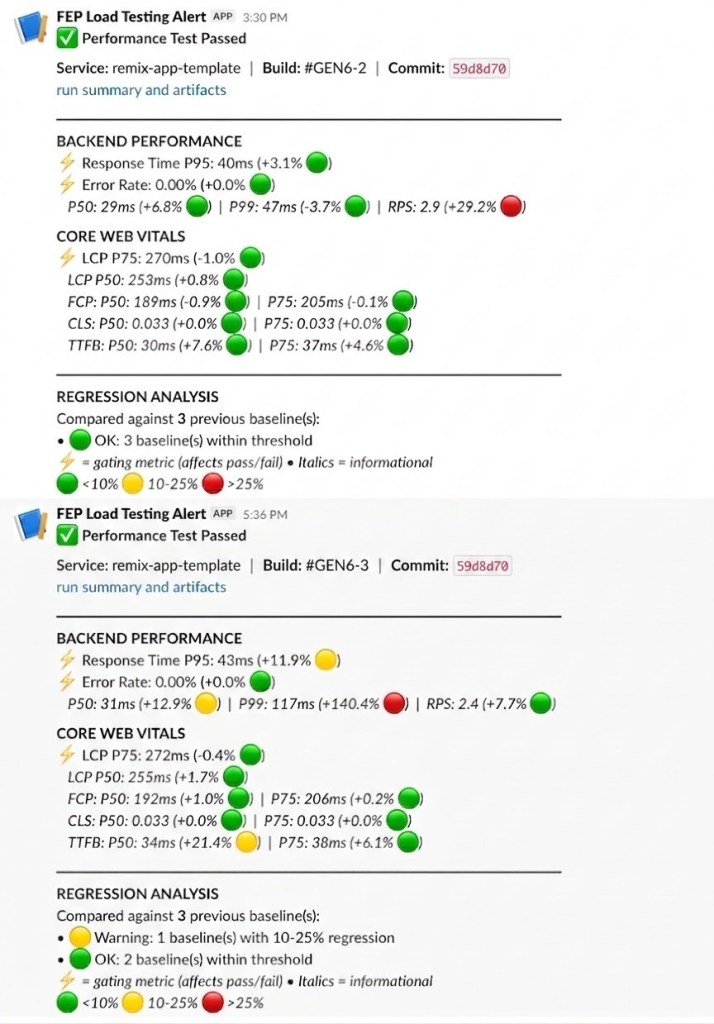
- Slack notification with P95, error rate, RPS, and all Core Web Vitals.
Result stability achieved: Runs against the same commit now show P95 differences in the range of ~10ms rather than 100–200ms swings. The LCP variance that was making regression detection impossible has collapsed. The pipeline can now reliably distinguish a real regression from infrastructure noise.
What We Learned
A few things stood out from this process:
The biggest source of variance wasn’t the test design — it was hardware. No amount of statistical filtering or outlier trimming would have fixed a 40% CPU clock speed difference.
Collecting enough data helps, but understanding what’s causing the variance is what lets you fix it.
Switching from ramping-vus to ramping-arrival-rate was the right call for regression testing. Load that couples to app performance can mask regressions; load that’s independent of app performance surfaces them clearly.
The constraint from EP — avoid instance pinning so results reflect real production scheduling — was initially frustrating but ultimately correct. The right fix was making the cluster more homogeneous, not making the test more artificial.
k6’s handleSummary API is genuinely powerful. The entire regression detection pipeline — baseline loading, majority voting, report generation, Slack notification content — runs inside handleSummary as TypeScript, without any external services. That simplicity has made the system easy to extend and debug.


