Category: Developer Experience

  • Creating a Centralized Developer Hub at CarGurus

    Creating a Centralized Developer Hub at CarGurus

    When CarGurus started our Decomposition Journey of monolith to microservices, we recognized the need for clear ownership boundaries and we created an internal tool, Showroom. What we didn’t predict at the time was that Showroom would become more than just a source of truth for ownership and an internal developer portal – it is now a centralized developer hub that enables us to work more efficiently in many different ways.

    Ownership Catalog

    The original plan for Showroom was to build a service and job catalog with clear ownership for each entity. At the time, not much was available on the market that met our requirements, so we decided to build in-house. Building this was an extremely easy concept, and at the time not much was but information quickly became stale, team names changed, and ownership moved around over time. We needed to explore ways to enforce accuracy in this system. We determined that there were two best ways to achieve this:

    1. Enforce registration at creation time
    2. Sync the data on a recurring basis

    For services, at the time, we were operating off of a monorepo, which made it difficult to automatically sync without writing some custom code parser. Instead, we decided to introduce a pipeline governance process called RoadTests which enforced that any new services added to the repository were also registered in Showroom. This proved to be really successful and, from this point forward, all services were in our catalog. For jobs, we decided to go with the second approach of syncing on a recurring basis. We leveraged a system to store and run our jobs, which made it easy to use their APIs to sync nightly for any changes or discovery of new jobs. Later on, we also introduced an internal library catalog and decided to go with a combination of sync and registration at creation time approach.

    Showroom Service Catalog
    Showroom Service Catalog

    Data Collection

    As the product evolved, we found that developers at CarGurus were looking for the same information spread across numerous systems. This led us to the idea of creating a data collection feature which automatically aggregated critical information about services that people were commonly looking for. This included data such as:

    1. A link to the codebase
    2. Log links for the various environments with predefined queries
    3. Any associated jobs with a service
    4. The build and deploy pipelines for a service
    5. Links to the service’s various hosts
    6. Links to the service’s API documentation

    This helped developers have a single spot for critical information for their services, serving as a common bookmark aggregator for our developers. It also allowed developers to manually add links that they found useful for others, such as documentation, FAQs, critical dashboards, or user guides.

    Showroom Data Collection
    Showroom Data Collection

    We then leveraged the same integration framework to get statistics about services for more real time data. These were simple data points about services, and available in other places, but by centralizing it, developers could answer these commonly asked questions with a glance:

    1. How many instances are running?
    2. How much memory is my service using?
    3. How much CPU is my service currently using?
    4. When was my service last deployed?
    5. What was my service last committed to?
    6. What does my service’s Snyk analysis show?
    7. How well is my service doing against DORA metrics?

    With both of these data collection features, we are able to expand them with critical information that our developers need working day to day on various artifacts within the catalog.

    Showroom Statistics
    Showroom Statistics

    Platform Integration Transparency

    In order to efficiently bootstrap our development, all of our services integrate with our platform offerings in some way to ensure they run smoothly in production; however, not all teams knew whether they were taking advantage of all the features we had to offer. Many teams leveraged the basic platform integrations, but there were many that had low adoption despite various communication avenues. As a result, the team created a framework called compliance checks, which enabled teams to quickly see a score for how well integrated they were with our platform. Each compliance check would analyze the service live to determine which integrations were enabled and functional. This provided the level of transparency back to our developers to determine if there was more they could take advantage of, further improving the reliability of their services.

    Showroom Compliance Checks
    Showroom Compliance Checks

    Self-service operations

    One of the critical pieces of any platform team is to create a self-service experience to enable developer productivity. At CarGurus, one of the levers we introduced was a workflows framework within Showroom that enabled us to automate and streamline the developer experience when performing various platform operations. Looking to introduce a new service, application, or library at the company? Go through Showroom. Want to transfer ownership of a service without breaking integrations and tagging across our stack? Go through Showroom. As we mentioned earlier, ownership changes naturally happen over time. Leveraging this framework, and having Showroom be the source of truth for ownership, helped us also manage our changes over time. With this framework, we are able to keep a single pane of glass for all the platform operations you’d need to perform against the artifacts stored in our catalog. Having this in a single spot allowed developers to look there first before resorting to manual ticketing and dependencies between teams. These self-service operations allowed developers to perform actions in days or even minutes that previously would take months end-to-end.

    Showroom Workflows
    Showroom Workflows

    Streamlined deployments

    Lastly, one of our key features in the product is visualizing and interacting with our deployments to production. We leverage traditional CI/CD tooling to do a lot of the heavy lifting, but we found even with this tooling, the developer experience allowed for far too many human errors to occur which was significantly impacting our lead time for changes. Showroom already had many of the integrations with our platform, so it was able to provide an easy button for our developers with a customized experience acting as a visual facade for our deployments at the company. Additionally, as we continued down the journey of microservices, it became critical to have a single spot to view all of the deployments. We were actively decomposing but things weren’t fully decoupled just yet. This allowed us to have a better pulse on any potential issues that may have been caused by cross-service deployments. There were previous attempts to modify the off-the-shelf tooling we leveraged to eliminate the human errors; however, this developer hub allowed us to prevent the human errors, especially those during emergency situations. This feature was met with incredible excitement by our developers as it streamlined their experience. We were deploying 16+ times per day across all of our services, so needless to say, it was very actively used.

    Showroom Deployments
    Showroom Deployments

    What’s next?

    There is no shortage of ideas here internally on how to continue enhancing Showroom to live up to its vision of being a full fledged centralized developer hub and further improve our efficiency. Many of those ideas continue to be discussed within the team and are being evaluated to determine which ones add the most value. One thing we know though, is the product we have built has already proven to be a great success in helping developers at CarGurus. We are excited to expand it into more developers’ hands at the company. Maybe even one day, we’d share it with those outside of the company as well.

  • How CarGurus is Supercharging Our Microservice Developer Experience

    How CarGurus is Supercharging Our Microservice Developer Experience

    Originally written by Jahvon Dockery, Principal Software Development Engineer.

    As you may expect, maintaining a continuously growing distributed system architecture does come with developer experience challenges. For instance, running the services in development may require additional services or you may need multiple backing data stores with realistic data. Also, building and deploying the microservices across environments may become more challenging as the expected configuration or underlying platform may be different. As Frank Fodera described in the last Revved blog post, Decomposition Journey at CarGurus, over the last couple of years CarGurus has invested significantly into decomposing our monolithic services into many smaller microservices. You must be wondering how we were able to make our development team way more effective given this shift. Let me walk you through how we are supercharging the developer experience at CarGurus!

    There are many tools that seek to solve some of these challenges and in some organizations, a large number of shared shell scripts fill the gaps that the tools don’t fill – that’s exactly what we were doing at CarGurus for a large part of our decomposition journey and we still leverage some of those scripts and tools today. However, that still leaves a lot of undesired complexity for software engineers who may need to use many tools and many scripts during the development process.

    Enter Mach5 – an internal tool which serves to simplify a lot of the complexity involved with developing, configuring, and releasing microservices that are part of CarGurus’ distributed systems.

    Introducing Mach5

    Over the last couple of years, the Engineering Platform team at CarGurus has worked with the CarGurus product engineers to understand their typical development workflows and pains. Given what we learned, we developed Mach5. Named after the Mach Five from the 1960s manga and animated TV series “Speed Racer”, its main goal is to simplify and supercharge the developer experience for our software engineers. Much like the supercharged car from “Speed Racer,” Mach5 has many features designed to help the user overcome challenges – in our case, development process challenges.

    From the developer’s perspective, Mach5 is a command line interface that acts against a “workspace” of configuration files that coexist with the microservice’s source code. Under the hood, the command line interface is running various processes locally, resolves service dependencies on demand, and triggers infrastructure operations based on the service’s Mach5 configuration through a backing Mach5 registry service.

    Understanding Mach5 Environments

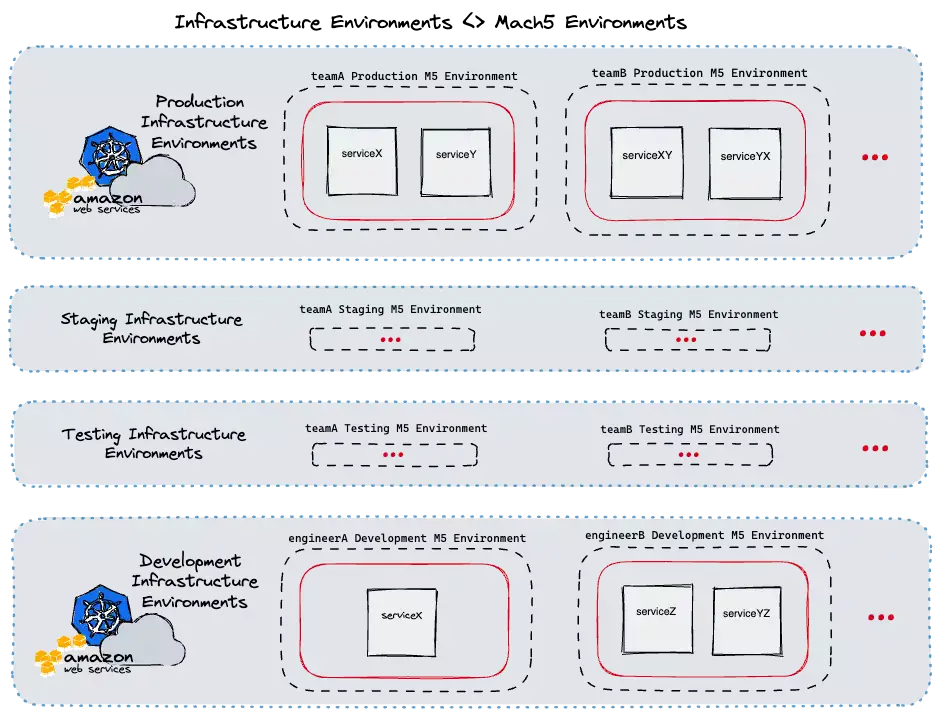
    A key component of Mach5 is the “Environment” concept. In Mach5, microservices are deployed to environments, therefore most Mach5 operations are done within the environment scope. Each Mach5 environment serves a specific purpose. For instance, each of our development teams have their own dedicated testing, staging, and production environments (for service deployments within those stages of the release cycle). In addition, each engineer also has their own dedicated development environments.

    Mach5 is able to map its own internal environments to the CarGurus’ infrastructure environments when acting on users’ requests. Given this, Mach5 can also provide guardrails around infrastructure environments that the typical user should not be modifying themself (e.g. production) . The below diagram illustrates this at a high level.

    Overview of mach5 environments
    Overview of mach5 environments

    We automate the creation of every environment based on an internal registry of development teams and software engineers. By automating this, we can guarantee that every new engineer onboarding into CarGurus and every new team that is created will have their Mach5 environments ready without any additional work on their part.

    Example use case – Mach5 deploy

    By far, the most used Mach5 CLI command by developers is mach5 deploy. This command simplifies many of the largest challenges around developing microservices in a distributed system.

    Overview of mach5 deployments
    Overview of mach5 deployments

    As shown in the above diagram, this single command triggers a multi-step workflow handled by the Mach5 CLI client and the backing registry service. We’ve designed Mach5 and the deploy command in a way that allows for extending and customizing the microservice deployment process without requiring the user to know too many specifics about the underlying platform that these services are running on. Now, let’s dive in deeper to understand some of the key parts of this workflow.

    Artifact build and publish

    At CarGurus, we have a variety of applications – including Java, Node, and Golang applications. We mostly leverage Bazel to build and publish these applications’ images. Often the first thing engineers will need to do if they wish to deploy a service for testing is set the correct Bazel tags or run the correct target. However, if you are working on multiple microservices, having to remember the various command syntaxes can increase an engineer’s cognitive load when context switching.

    This becomes even more challenging to do when teams need their own custom build logic or if they are using Maven instead. Mach5 is agnostic about the build and artifact publishing systems it uses. The underlying logic of those steps can be configured through scripts by our product engineers as part of the deployment’s preconditions. When an engineer runs a mach5 deploy, the client will automatically run those preconditions against the current code that the user has locally. The published artifacts are then used for the next step of the deploy, the workload deployment.

    Following a deployment, Mach5 will also run any configured postconditions for that service. A common use case for postconditions is syncing local assets to an external file system for the deployed service to use. Preconditions and postconditions lowers the barrier to entry for engineers across teams who may want to get a service that they don’t actively work on running without having to follow a series of manual steps for bootstrapping the service.

    Workload deployment

    A core principle we have for Mach5 is that its deployment is meant to be infrastructure-agnostic. Currently, CarGurus use Kubernetes to run most of our application workloads and have clusters for our production, staging, and development environments. Within each of those clusters, we associate namespaces to the various Mach5 “environments” described above. Our main use case currently is for deploying within these Kubernetes clusters but we have plans on extending Mach5 using our internal provider interface to enable users to deploy different types of workloads, such as AWS Lambda functions.

    Kubernetes can be a complex system to work with for many product engineers. There are many tools for deploying a workload to Kubernetes; including using kubectl or Helm directly. However, given the complexity of Kubernetes, it may not be safe to allow every software engineer to have access to applying changes into a Kubernetes cluster directly. With the provider interface I mentioned, Mach5 can be configured to deploy a raw Kubernetes manifest or it can take in a Helm chart and values files for the deployment.

    This gives us a great chance to do some pre-deployment processing and validation and to limit the permissions down to our single Mach5 backing registry. We are also planning on supercharging this process even more by enabling Mach5 to integrate with Kubernetes operators that respond to specific Custom Resource Definitions.

    Service Dependencies and Delegates

    One of the biggest challenges with developing a microservice is understanding service dependencies. At CarGurus our product engineers maintain over 80 microservices and that number continues to grow. In addition, each service may need a backing data store or they may need to leverage external systems like Kafka for messages. This is where Mach5 really drives a more seamless developer experience! Before we get to that, let’s revisit the “environment” concept.

    At a high level, each environment ends up being a collection of deployed services. With what we call “delegation”, that collection of services is conceptually expanded into a larger collection. Here is a simplified YAML representation of how a Mach5 environment is typically composed:

    name: engineerA
    selectors: [development]
    data:
      delegatedEnvironments:
      - name: global
        selectors: [staging]
      - name: teamA
        selectors: [staging, internal]
      deployments:
      - name: serviceA
      - name: serviceA
        selectors: [testingChange1]
      - name: serviceB
        selectors: [testingChange1]
      kubernetesData:
        cluster: dev-cluster-na
        namespace: engineerA-user-namespace
      owner: engineerA

    As part of an individual Mach5 service’s configuration, you can specify the dependencies on other services. The Mach5 registry that backs the CLI operations knows about all environments and all currently existing deployments. If it detects that service X depends on service Y, it will first check the current Mach5 environment for service Y. If it does not exist there, then it will check the delegated environments noted above to find the next closest match. All development Mach5 user environments are delegated to our staging environment.

    We represent the data stores and external systems as services that can be added to specific environments so the same searching will be applied to those dependencies. Thanks to Mach5, once the workload for service X has been deployed, it routes to the identified dependent services without requiring the engineer to separately deploy all of its dependencies.

    Overview of mach5 service resolution
    Overview of mach5 service resolution

    As you’d imagine, this provides some great benefits. If an engineer would like to test changes to two services together, all they have to do is deploy both of those services to their environment. They can even deploy their own instance of the backing data store if they do not want to use the delegated staging data store.

    At any point, they can use a mach5 undeploy command against their services when they are done testing or if they want to fall back to using the delegated service.

    Selectors

    Many software engineers may run into cases where they would like to do testing against one git branch, pass it off for feedback or testing, and continue additional development while they wait. That’s where our selector capability comes in. Selectors allow different variants of a single service to be deployed and linked to other similar variants.

    A user can specify an optional selector with any Mach5 deployment. That will follow the same flow as described above but it will keep any existing deployment without the specified selector untouched. As shown in the diagram above, the selector is also used as part of the service dependency search; so you can deploy multiple versions of a service within your environment (with differing selectors) but Mach5 will prefer the dependent services with a matching selector over deployments without one.

    For Mach5 environments, we use selectors to describe the various purposes of those environments. For instance, teamA will likely have 3 environments as noted above. The name is always teamA but the various selectors would be testingstaging, or production to represent those stages of the release cycle.

    Additional Debugging Tools

    The Mach5 CLI and the backing registry service are continuing to grow based on feedback from our internal product engineers. This has shaped Mach5 into a much more robust tool for all software engineers in the organization. In addition to managing microservice deployments, the CLI can be used to get information like available ingress hosts and logs for existing deployments.

    We are continuously learning, iterating, and improving Mach5 as a means to improve our overall developer experience at CarGurus. If this is something you’re interested in then I recommend checking out our open roles!

  • Better Living Through Asset Isolation

    Better Living Through Asset Isolation

    From its humble beginnings as a blog for the automotive community, the last 15 years have seen CarGurus’ offerings grow to almost two-dozen independently deployable web applications, supported by roughly 180 backend services and systems. As our product offerings have expanded, our tech stack and system architecture have had to evolve to meet the needs of our engineering community. The cornerstone of this process has been the decomposition of our monorepo into a more tightly focused multi-repo environment. This process presented a significant front-end decomposition challenge: the efficient management, hosting, and delivery of static image assets.

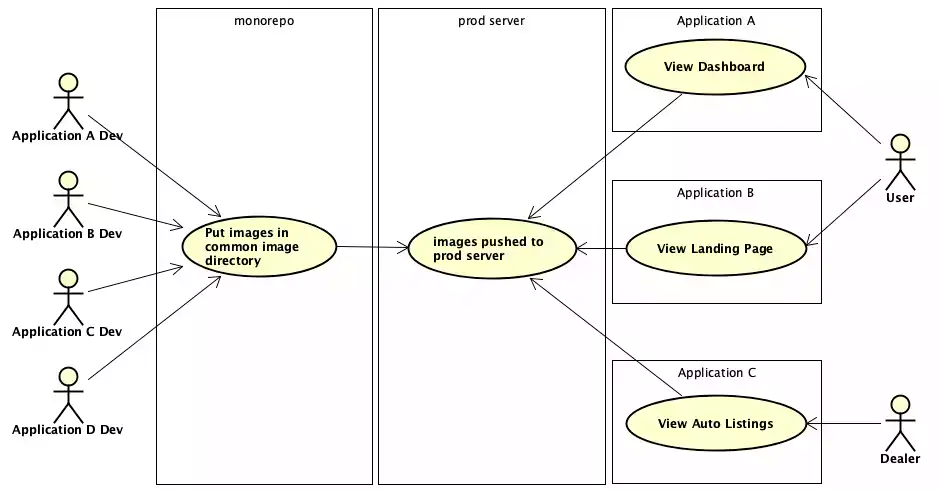
    While we have been wildly successful at decomposing our back-end ecosystem (a fascinating topic that will be covered in a future post), our front-end application code, static assets, and build processes are still tightly coupled in many ways. Historically, devs from different application teams would store their image assets in a common directory in the CarGurus monorepo. When a new version of an application was deployed to production, the image directory was copied in its entirety to our production server. This was a reasonable approach when CarGurus was little more than search engine for auto sales, but as our application ecosystem grew to include car listings, financing pre-qualification, sales, and other tools to assist buyers and sellers, the images directory not surprisingly ballooned in size. In addition to steadily increasing build and deployment times, we were aware of the potential dangers inherent in allowing independent applications to share image assets, excepting brand-related images such as logos.

    the world that was behaviour diagram
    The world that was behaviour diagram

    Isolated Asset Storage and Management

    The guiding principle behind our new static asset management strategy was the belief that static assets should be isolated by independently deployable application. The practice of adding assets to the common image directory in our monorepo has been replaced by storing assets in application specific buckets hosted on our cloud services provider. Buckets are accessed via a new internal dashboard, the Static Asset Manager (SAM), which provides developers and designers an easy drag-and-drop interface for uploading and managing an application’s assets. The bloating of the common images directory has been brought to a halt, and the migration of existing image assets from our repo to the cloud has resulted in a not insignificant decrease in the size of our monorepo.

    the world we want behaviour diagram
    the world we want behaviour diagram

    The SAM interfaces with our cloud storage provider via a RESTful API. To streamline development, we leveraged the cloud provider’s serverless offerings for easy asset upload, modification, and deletion. The SAM was architected so that the more complex details of interacting with the cloud service REST API have been obfuscated from the front-facing interface through a set of helper classes (software design pattern aficionados will recognize this approach as the Gang of Four Facade pattern). The SAM does not need to know or care which cloud service it is interacting with, and additional cloud providers or services can be integrated easily into the tool through the development of alternate helper class implementations of the same interface.

    Efficient Caching and Serving of Image Assets

    In addition to improving our build and deployment times, forefront in our mind was the need to efficiently version, cache, and serve our image assets. To achieve this, we applied a versioning strategy based on image fingerprinting. Image fingerprinting involves computing the checksum of an asset’s contents, and appending that hash value to the asset filename. The hash is representative of the asset’s data, and is guaranteed to be consistent and unique. Updated versions of an asset can be uploaded via the SAM and as long as the contents of the file have changed, a new checksum will be calculated. In addition to ensuring that an asset cannot be accidentally overwritten by another asset with the same name, the concatenated filename-hash provides implicit asset versioning. As such, there is no need to bust the cache when uploading an updated asset. The updated image may have the same base name, but thanks to the appended hash value, the CDN will treat it as a new resource and serve it appropriately. The previous version of the asset will still be cached, however, making it immediately available if an application ever needs to be rolled back.

    Results

    The new paradigm of image hosting and management was well received by the application dev teams. In the spirit of allowing each team to manage their assets as they see fit, we did not mandate how a given team handled moving their assets to the new service. The popular approach seems to be to host new assets in the SAM, while incrementally moving older assets over as time allows. Build and deployment times have stabilized, and even decreased for some applications.

    The updated caching strategy was evaluated by analyzing the quality and performance of one of our applications using Chrome’s Lighthouse tool. Prior to the fingerprinting and isolation of the application’s image assets, Lighthouse calculated a performance score of 80. This was not great. As the following image shows, our Time to Interactive was greater than 2 seconds, with the Largest Contentful Paint requiring a snail-like 3 seconds to complete. Given that it takes seconds for a webapp user to form an opinion about a site, these values were not acceptable. Lighthouse informed us in big red letters that we needed to “serve our static assets with an efficient caching policy”. Enter the SAM.

    pre-SAM Lighthouse score
    pre-SAM Lighthouse score

    After fingerprinting and re-hosting the static image assets in their application’s new cloud storage bucket, we ran the Lighthouse analysis again. The result was a performance score of 99. The Largest Contentful Paint required only .8 seconds, while the Time to Interactive had been reduced to a blistering .5 seconds. The results speak for themselves.

    post-SAM Lighthouse score
    post-SAM Lighthouse score

    While our front-end development and asset hosting strategies continue to evolve, there is no question that this new approach to static asset management has been an overwhelming success. To quote one of the front-end devs from the product team that owned this application, “everyone in the company should be using this tool.” With adoption increasing daily, we look forward to seeing the increasing performance benefits to our users.